
 PacketWatch Team Sixty43
9 min read
ClickFix Abuses ‘finger’ To Deliver CastleLoader
PacketWatch's Team Sixty43 profiles how a ClickFix attack leverages the finger protocol to deliver its first payload (CastleLoader). See the TTPs...
PacketWatch's Team Sixty43 profiles an M365 threat traced to Device Code Phishing, complete with tactics, techniques, and procedures.
Beginning in early April 2026, Team Sixty43 responded to an increasing number of incidents involving M365 data theft. We were able to forensically trace the majority of these incidents to one insidiously simple and effective phishing method: device code phishing. Using this technique, threat actors have been able to easily trick users into registering malicious devices into the victim’s M365 environment, rendering MFA and the usual remediation steps for phishing ineffective. Based on our findings, the core issue is that device code authentication flows are allowed for M365 and Azure by default. This puts every M365 and Azure tenant at risk to this phishing technique unless specific conditional access policies are put in place.
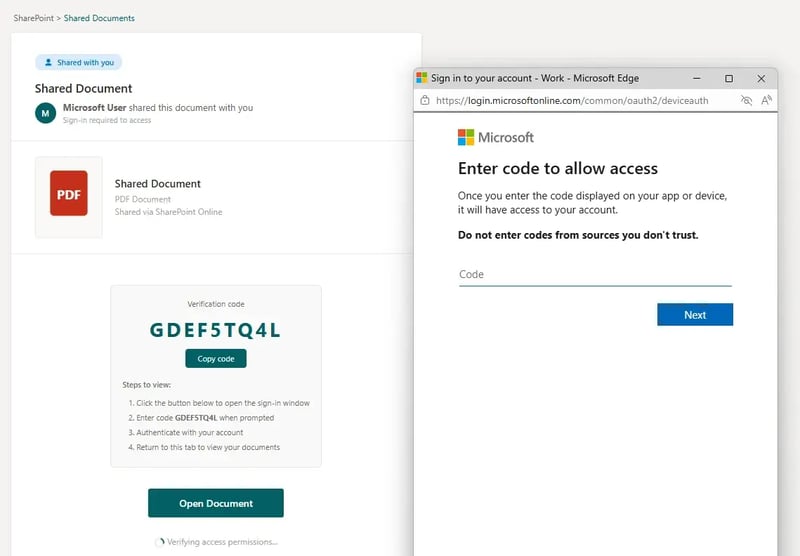 Figure 01: An example of a device code phishing site
In early April 2026, Team Sixty43 began observing a massive uptick in requests for our Business Email Compromise (BEC) DFIR service. While investigating these incidents, we noticed several things they all had in common:
Most attacks originated from a vendor or partner that the client trusted
The threat actor’s goal seemed to be data theft, with suspicious Outlook rules being created for data exfiltration
Most phishing lures were PDF or DocuSign themed, pressuring the user to visit the link and input a code to access said documents
Most victims were insurance or financial vertical businesses
Most incidents originated from a phishing email that lured the user to a site that convinced them to input a code into the device authentication pop-up for M365
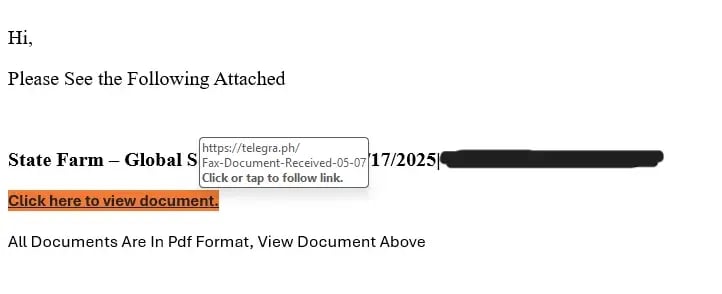 Figure 02: An example of an email from a compromised trusted vendor with the lure in it
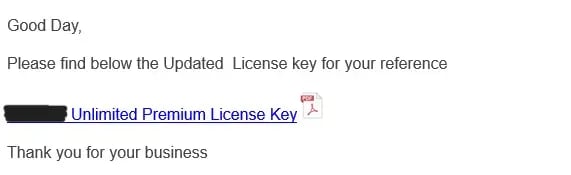 Figure 03: Another example of a compromised trusted vendor sending a PDF-themed phishing lure
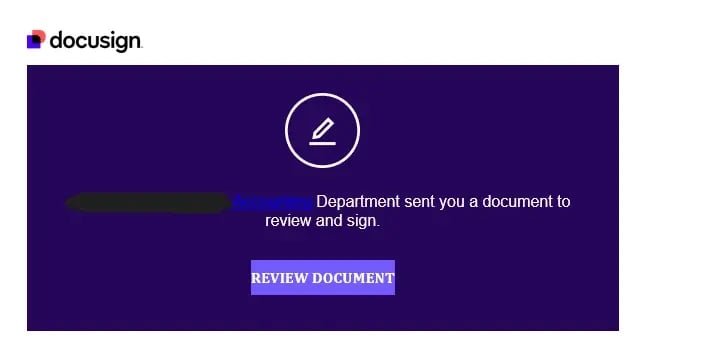 Figure 04: A DocuSign-themed phishing email
While Team Sixty43 has worked on BECs related to device code phishing in the past, and open-source reporting on this technique possibly goes back to October 2020, with a post on “aadinternals[.]com” detailing how this attack works, it seems that since April 2026, threat actors have gravitated to this technique due to how absolutely effective it is at easily tricking users.
Device code authentication is a form of authentication for M365 and Azure wherein devices that have limited input options can authenticate into your tenant. This was built with devices like IoT and conference rooms in mind, not as a secure method of authentication. Per Microsoft’s own documentation:
“Device code flow is a high-risk authentication method that can be part of a phishing attack or used to access corporate resources on unmanaged devices. ... Allow device code flow only where necessary. Microsoft recommends blocking device code flow wherever possible.”
It is enabled by default for all M365 and Azure tenants.
The attack begins with an email from one of your known vendors. This is someone you have worked with for years. They ask you to access a document via a link. You click, and it redirects you to what appears to be their SharePoint site. The site instructs you to copy the code it presents. You copy the code, and a pop-up appears. You input the code into the pop-up, but you do not get your document. Click, copy, paste.
From there, the attacker now has access to the tenant via the user’s access and refresh tokens, and by registering their malicious device under the user’s account. This allows the attacker to gain entrenched persistence with ease, as resetting passwords and even revoking session tokens is often not enough to fully kick out the intruder.
Once in, the threat actor gets to work quickly, accessing mailboxes, creating rules to exfiltrate data, and accessing other sources of valuable information, like SharePoint. In Team Sixty43’s forensic analysis of these attacks, most occurred within mere hours.
It should be noted that any site that can host web data can be used as a phishing lure for this technique. This includes, but is not limited to:
• Telegra[.]ph
• *.zohopublic[.]com
• *workers[.]dev
• Dropbox
• Compromised WordPress sites
The following remediation steps have been used by Team Sixty43 to successfully revoke the threat actor from the client’s tenant:
Additionally, we highly recommend that all organizations implement Conditional Access Policies (CAP) to block device code authentication. If needed, policies should be set in place to only allow certain devices in specific groups to authenticate this way from allowlisted IPs. Device code authentication needs to either be blocked or restricted thoroughly, as it is a massive security liability.
We recommend following Microsoft’s guidance on blocking these authentication flows (linked below). It is highly recommended to set these policies to “Report-only” first for at least a week, and then “Enforce” to avoid any accidental business disruptions.
We want to note that in order to apply these conditional access policies, organizations need to have Microsoft Business Premium licenses or higher (Microsoft 365 E3 or E5, or Entra ID P1/2 add-on).
As well, we have noticed that some organizations may have had these policies implemented for them by Microsoft itself. This appears to be random, and organizations need to verify on their own to ensure that their tenants are safe from these attacks.
Thanks to AI, threat actors are becoming faster and faster. They pivot more quickly to new techniques, attack in greater volume, and complete their objectives in less time. Organizations are struggling to keep up using reactive approaches to cybersecurity. The need for proactive defensive measures is greater than ever. This means reviewing cloud tenants for misconfigurations and continuously monitoring for signs of compromised identities and suspicious activity, such as Outlook rules that forward data to suspicious email addresses.
Since many of these attacks originated from compromised vendors sending phishing emails, traditional email defenses are not effective, as these emails are whitelisted for business purposes. Only intelligence-led, Full Packet Capture threat hunting can effectively identify and stop innovative threat actors from compromised unsuspecting organizations.
This profile is provided FREE to the cybersecurity community.
Visit our Cyber Threat Profile Blog for additional profiles.
Visit our Cyber Threat Intelligence Blog for intelligence reports.
Subscribe to be notified of future intelligence profiles and reports:
9 min read
PacketWatch's Team Sixty43 profiles how a ClickFix attack leverages the finger protocol to deliver its first payload (CastleLoader). See the TTPs...
4 min read
PacketWatch's Team Sixty43 profiles an M365 threat traced to Device Code Phishing, complete with tactics, techniques, and procedures.
4 min read
PacketWatch's Team Sixty43 profiles a threat involving EvilAI and Vibe-coded malware, complete with tactics, techniques, and procedures.